
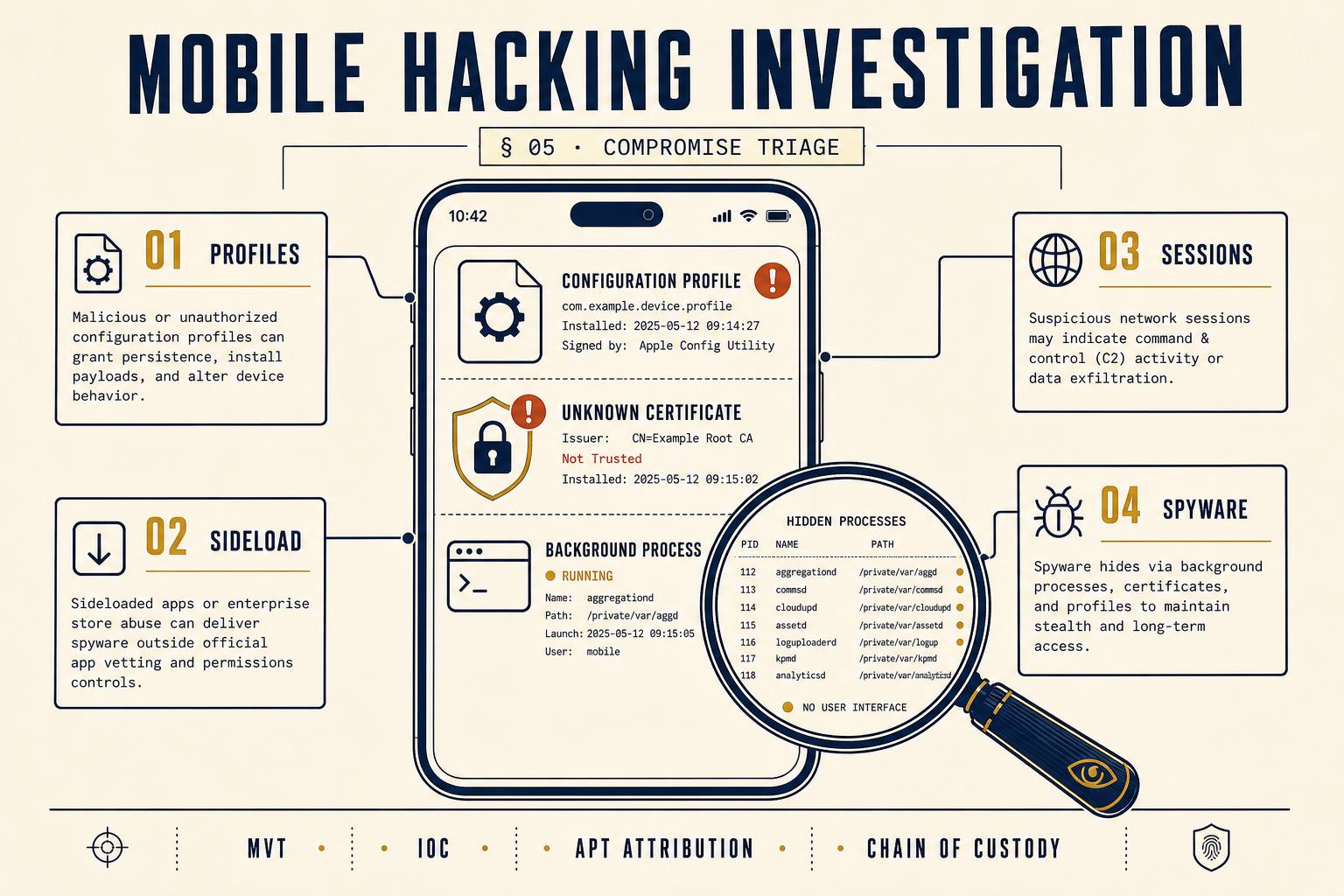
What we look for on iOS
- Unknown configuration profiles under Settings → General → VPN & Device Management, particularly those signed by non-Apple certificates.
- Mobile Device Management (MDM) enrolments the client does not recognise, which grant remote control over the device.
- Enterprise developer certificates permitting sideloaded applications outside the App Store review process.
- Unusual entries in KnowledgeC and biome streams: applications launched at times the user was asleep, background audio activations, camera invocations without user action.
- Indicators of commercial spyware (Pegasus, Predator, Reign) via the MVT (Mobile Verification Toolkit) IOC set, where the case profile - journalism, activism, high-conflict divorce, corporate espionage - justifies the check.
What we look for on Android
- Sideloaded APKs installed from unknown sources, particularly those with Accessibility Service permissions granted.
- Device Administrator rights held by unfamiliar applications - the classic stalkerware persistence vector.
- Notification listener permissions granted to non-messaging apps, which allow silent capture of every notification, including 2FA codes.
- Hidden launcher icons: applications installed with no visible entry in the app drawer, typical of consumer spyware brands (mSpy, FlexiSpy, Hoverwatch, Cocospy).
- Unusual entries in package installer logs, adb-installed applications, and root-managed persistence.
The account layer: often where the real compromise lives
In perhaps six out of ten "hacked phone" investigations, the device itself is clean and the compromise is at the account layer. Someone knows the client's Apple ID or Google password - a former partner, a family member, a colleague - and is signed in silently on another device with access to iMessage, iCloud photo library, browsing history, calendars, location and, on iOS, Find My. The device does not need to be touched at all.
| Account | Where to check | What a compromise looks like |
|---|---|---|
| Apple ID | appleid.apple.com → Devices; Settings → [name] → Devices | Devices the client does not own; sign-in from unknown IP/geography |
| myaccount.google.com → Security → Your devices | Unfamiliar Android device or browser session with sync enabled | |
| Settings → Linked Devices | Web / desktop session the client did not authorise | |
| iCloud Family / Google Family | Family group settings | Silent member with location sharing enabled |
| Microsoft 365 / Outlook | account.microsoft.com → Security → Sign-in activity | Sign-ins from unexpected countries, forwarding rules |
How the investigation is actually run
- 01Preserve. Isolate the device (Faraday bag or airplane mode with Wi-Fi/Bluetooth disabled). Do not power off, do not factory reset, do not change passwords from the compromised device.
- 02Extract. Full file system or physical acquisition, keeping the device in its current state. On iOS, MVT-compatible extraction where spyware is a working hypothesis.
- 03Baseline. Compare installed packages, running processes, configuration profiles and account sessions against the client's own account of what should be present.
- 04Enumerate anomalies. List every unrecognised profile, certificate, background process, notification-listener grant and linked-account session, with timestamps.
- 05Attribute where possible. Push tokens, MDM issuer URLs, developer certificate common names and stalkerware phone-home domains frequently identify the operator - sometimes down to a named account.
- 06Report. A written report suitable for internal action, insurance claim, criminal complaint (Computer Misuse Act 1990) or civil injunction, as the case requires.
What clients should do the moment they suspect it
Well-meaning IT support that wipes and rebuilds the device is the single largest cause of failed hacking investigations. Preserve first. Investigate second. Remediate last.
- Stop using the device for anything sensitive. Move critical logins to a known-clean second device.
- Do not factory reset. A reset destroys the profiles, certificates, sideloaded applications and log entries that would identify the intruder.
- Do not change passwords from the same device. If a keylogger or accessibility abuse is active, the new password is captured too.
- Enable two-factor authentication on the account layer from a different device; sign out all sessions from the account provider's website.
- Contact an examiner before rebuilding. Preservation is measured in minutes; reconstruction after a wipe is often impossible.
When to escalate to police
Genuine compromise of a mobile device by a third party is an offence under sections 1 to 3 of the Computer Misuse Act 1990. Where the offender is known, or is likely to be identifiable from the forensic evidence, a report to Action Fraud (England, Wales and NI) or Police Scotland is appropriate. Where the offender is unknown but the case value warrants it, the National Cyber Crime Unit accepts referrals via local force cyber teams. A properly conducted private investigation typically produces a report the police can act on; a wiped and rebuilt device produces nothing.
Frequently asked questions
Only partially. A visual check of profiles, certificates and installed applications catches consumer stalkerware. Detecting nation-state spyware such as Pegasus requires MVT or equivalent analysis of iOS diagnostic archives - which is a forensic extraction step.
Yes, historically. Zero-click delivery via iMessage and FaceTime has been documented in multiple Citizen Lab and Amnesty Tech reports. Modern iOS (Lockdown Mode; recent CVE patches) has narrowed the window, but the risk is not zero for high-profile targets.
Legally, unauthorised access is unauthorised access - the Computer Misuse Act does not require sophisticated techniques. Forensically, the distinction matters because credential-based access leaves account-side traces (sign-in logs, session cookies), whereas true device compromise leaves device-side traces (profiles, malware, exploit remnants).
Preliminary triage: 24 to 48 hours. Full forensic examination with MVT-style spyware analysis: one to two weeks. Report drafting: a further week. Urgent cases can be prioritised where injunctive relief is contemplated.
Sometimes. Consumer stalkerware phones home to an operator account which is often identifiable. Configuration profiles carry the issuer's common name. Push token history can link back to another Apple ID. Nation-state operators are much harder to attribute publicly, though technical indicators (infrastructure, TTPs) often align with known campaigns.