
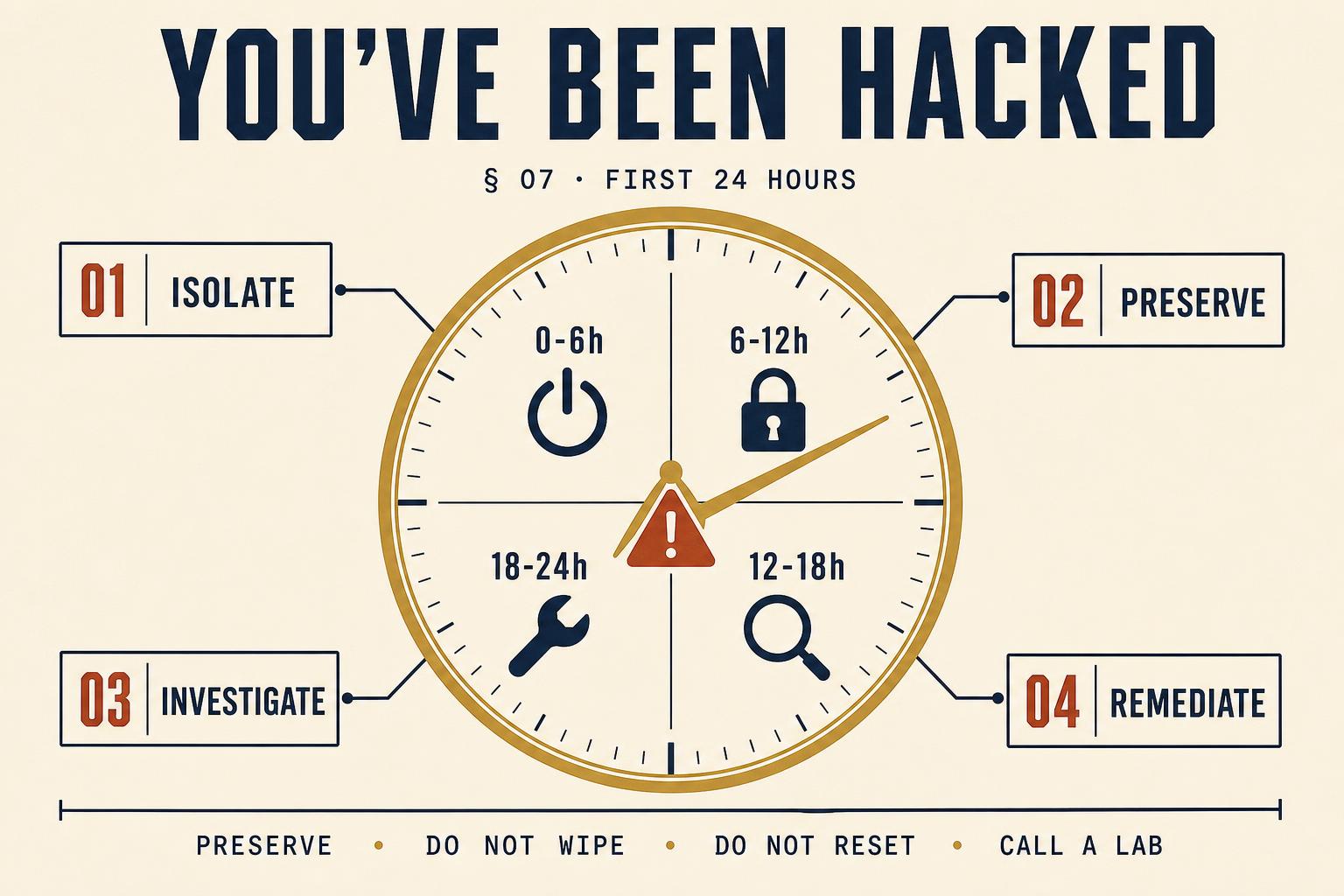
Hours 0–6: isolate
- Take affected devices off the network - pull the ethernet cable, disable Wi-Fi at the device - but do NOT power them down. Volatile memory (RAM) holds keys, tokens and injected process code that vanish on shutdown.
- Physically disconnect any external storage that was mounted at the time of discovery. Leave it in the state it is in.
- Where a mobile is involved, put it in a Faraday bag or airplane mode with Wi-Fi and Bluetooth disabled. Do not factory reset.
- Notify anyone who shares the account (spouse, business partner, IT admin) that they should not log in from any device until you say otherwise.
- Record the time, the symptoms, and any error messages, in a contemporaneous note. Sign and date it. This becomes the first entry in the chain of custody.
Hours 6–12: preserve, on copies
The single most important principle: never investigate the original. The forensic response is to take a hash-verified image of every affected device and to export every relevant account log, and then to close the originals and work exclusively on the copies. Doing this properly in the first working day gives the investigation a chance; skipping it forecloses almost every avenue an examiner would otherwise take.
- 01Full-disk image. A bit-for-bit image of each affected computer's storage, hashed at acquisition, with a chain-of-custody entry signed by the examiner.
- 02Memory capture. Where the device is still powered on and the compromise is recent, a RAM dump captures keys, tokens and running malware that a disk image alone will miss.
- 03Mobile extraction. Full file system or physical acquisition of any implicated handset, in its current state, before any credential rotation.
- 04Account exports. Sign-in activity, audit logs and mailbox exports for Microsoft 365 / Google Workspace / Slack / AWS / GitHub, taken from an admin account on a known-clean device.
- 05Network artefacts. Firewall, proxy and DNS logs for the incident window, exported before rotation truncates them.
Hours 12–18: investigate
With the evidence preserved, the examiner reconstructs three things: how the intruder got in (initial access vector), what they did once inside (dwell time, lateral movement, data accessed), and what they took out (exfiltration). Each of those has a defined artefact set - sign-in logs, ShimCache, Prefetch, AmCache, Windows Event IDs 4624/4625/4672/4720, LNK files, browser history, USB device history, cloud drive sync logs, mail auto-forwarding rules - and each artefact is examined on the image, not the live system.
| Question | Where the evidence lives | Typical retention |
|---|---|---|
| How did they get in? | Email gateway logs; VPN logs; MFA logs; phishing landing pages in browser history | 30–90 days |
| When did they get in? | Sign-in audit logs; Event ID 4624 (successful logon) | 90 days default (Microsoft 365) |
| What did they do inside? | Command-line history; PowerShell logs; ShimCache; AmCache; Prefetch | Persistent, but overwrite on reuse |
| What did they take? | Cloud drive sync logs; browser download history; email send logs; DLP alerts | Varies by platform |
| Are they still there? | Scheduled tasks; run keys; new local accounts; mailbox forwarding rules; app passwords | Persistent until removed |
Hours 18–24: remediate - and only now
- Rotate credentials on every account touched, and every account sharing a password with a touched account.
- Revoke and re-issue all API keys, app passwords, OAuth tokens and personal access tokens for the affected accounts.
- Terminate every session on the identity provider (Microsoft 365 / Google Workspace / Okta) and force re-authentication with MFA.
- Remove attacker persistence: scheduled tasks, run keys, new local accounts, mailbox forwarding rules, mail transport rules.
- Rebuild the device from a known-clean image only after the forensic copy is complete and stored.
Notification obligations you cannot skip
Under UK GDPR Article 33, personal data breaches must be notified to the ICO within 72 hours of the controller becoming aware, unless the breach is unlikely to result in a risk to individuals. The 72-hour clock starts running from the moment of awareness, not from the moment of full investigation - which is why an interim notification is often required even before the forensic picture is complete. In regulated sectors (financial services, health, telecoms), sector-specific reporting timelines are shorter still.
The single fastest way to convert a recoverable incident into an unrecoverable one is to have a well-meaning member of staff reset every password, wipe the device and restore from backup before an examiner has taken a copy. Nothing else comes close.
Frequently asked questions
That is a business, legal and insurance decision, not a technical one. Payment does not guarantee decryption, may fund a sanctioned entity (with criminal consequences under the Terrorism Act / OFSI regime), and does not remove the intruder from the network. Take advice before responding to any demand.
If personal data is affected and there is any risk to individuals, yes - within 72 hours of awareness. An interim notification with what is known so far is expected; a full picture at the point of first notification is not required.
Disconnect from the network, do not shut down. Volatile memory holds evidence - including malware injected only in RAM - that a full-disk image cannot recover after a power-off.
Only if you have staff trained and tooled for it, working outside the compromised environment. Most organisations do not. Retaining a specialist for the first 24 hours is far cheaper than reconstructing what has been overwritten by a good-faith cleanup.
The investigation gets harder, not impossible. Cloud logs may still be available. Backups may contain pre-remediation artefacts. Endpoint telemetry (if EDR was in place) frequently survives. Preserve whatever remains, immediately, and stop remediating further.